This article helps you set up and manage tips on your payment terminal. You can customise tip percentages and enable or disable tips.
All of these settings must be configured through the customer portal.
Accessing tip settings
Login to the Flatpay portal.
- Log in to the customer portal
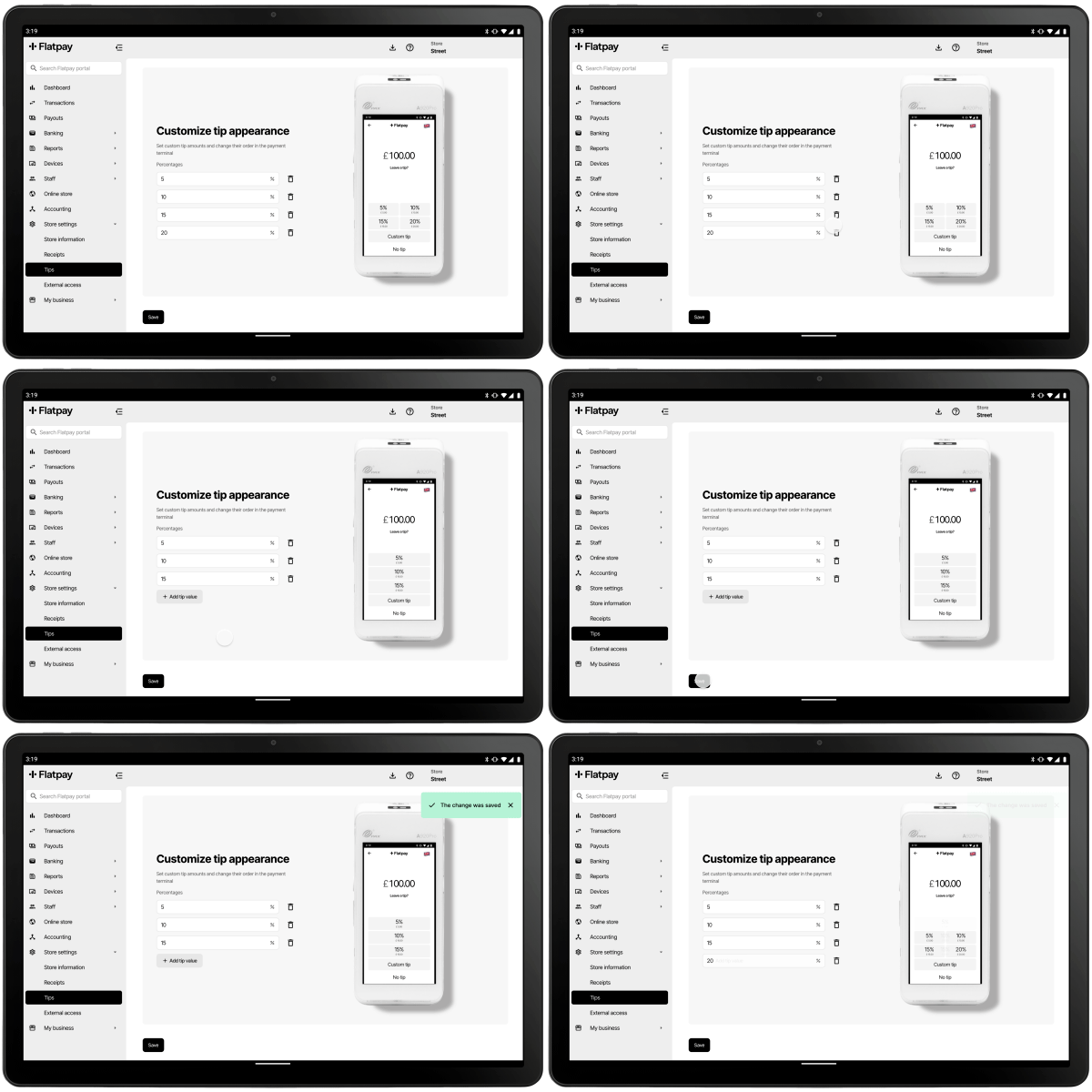
- Navigate to Store settings → Tips
- Here you can configure what tip-amounts you want your terminal(s) to display.
Enable tips on your terminal
- Go to Devices → Terminals
- Toggle the button to Enabled if you want the terminal to prompt customers to add tips during the payment process.
Saving changes
Once you’ve configured your tip settings, make sure to save your changes in the customer portal. These settings will be applied immediately, and your terminal will begin using the new configurations for all future transactions.
Was this article helpful?
That’s Great!
Thank you for your feedback
Sorry! We couldn't be helpful
Thank you for your feedback
Feedback sent
We appreciate your effort and will try to fix the article