In this article, discover all the information you need to know about lunch cards and where to find them in your customer portal. We also guide you in more detail through the terms of these cards and how to set them up on your Flatpay payment terminal.
Reminder: This guide is specifically about lunch cards in France.
Lunch cards accepted by Flatpay
Our payment terminals are compatible with the following lunch cards:
• Swile
• Bimpli
• Edenred
• Pluxee
• Upcoop
How can I accept lunch cards in my business?
First, you must contact the issuers of these cards in order to set up a contract with them; this contract cannot be established by Flatpay.
You can then choose which lunch cards you want to accept in your business by contacting the issuers directly.
Once the contract is set up, you will receive a Merchant Registration Card and a CONECS identifier, which you must keep carefully.
The contract signed with the lunch card issuers is independent of your Flatpay contract. These two contracts operate separately and are managed independently.
How do I activate them on my terminal?
To activate lunch cards on your terminal, follow these steps:
• Contact your dedicated sales representative or our support team to request activation
• Provide your CONECS identifier and your SIRET number associated with your CONECS number
Where can I see my lunch card transactions in the portal?
You can find the volume of your transactions made with lunch cards directly in your customer portal.
If you only have a Flatpay terminal:
• Log in to your customer portal
• In the left-hand menu, click on “Transactions”
• Once the page is displayed, click on “Lunch cards” just next to “Cards”
• Select the period you want to view and your transactions will appear
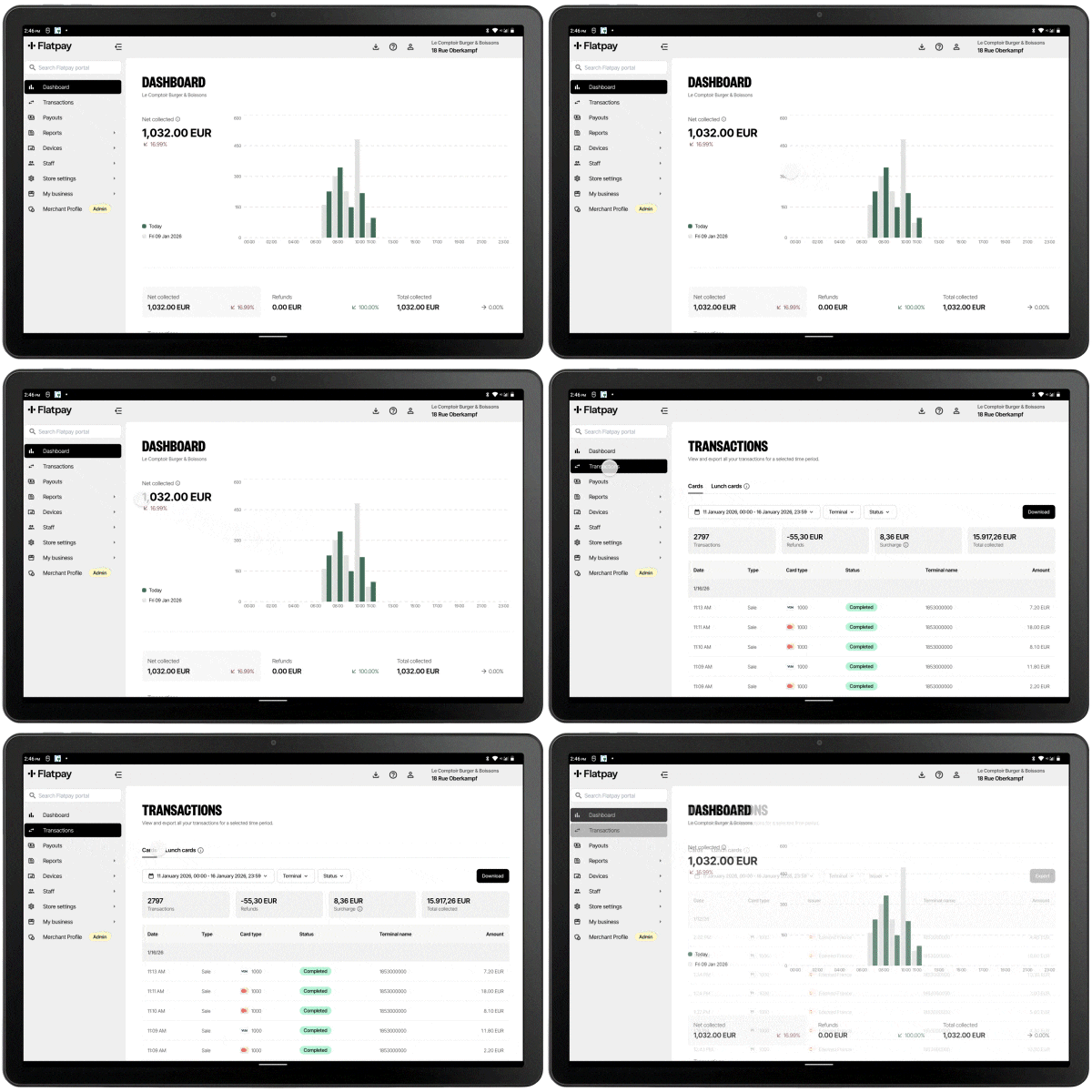
If you have both a cash register and a terminal:
• Log in to your customer portal
• In the left-hand menu, click on “Sales” and then on “Card transactions”
• Once the page is displayed, click on “Lunch cards” just next to “Cards”
• Select the period you want to view and your transactions will appear
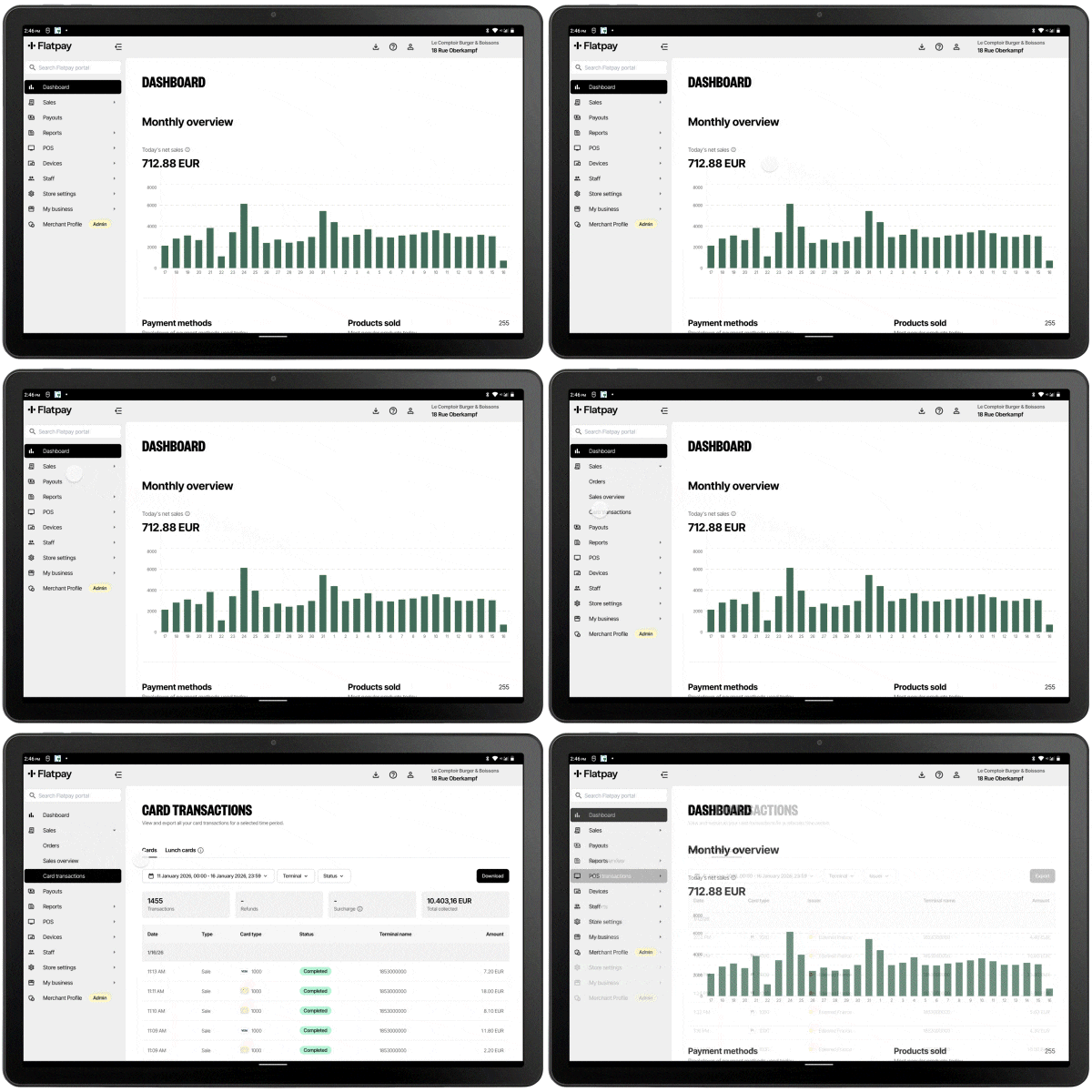
This section allows you to view the details of payments made with lunch cards and to get an overall view of the volume generated over the selected period.
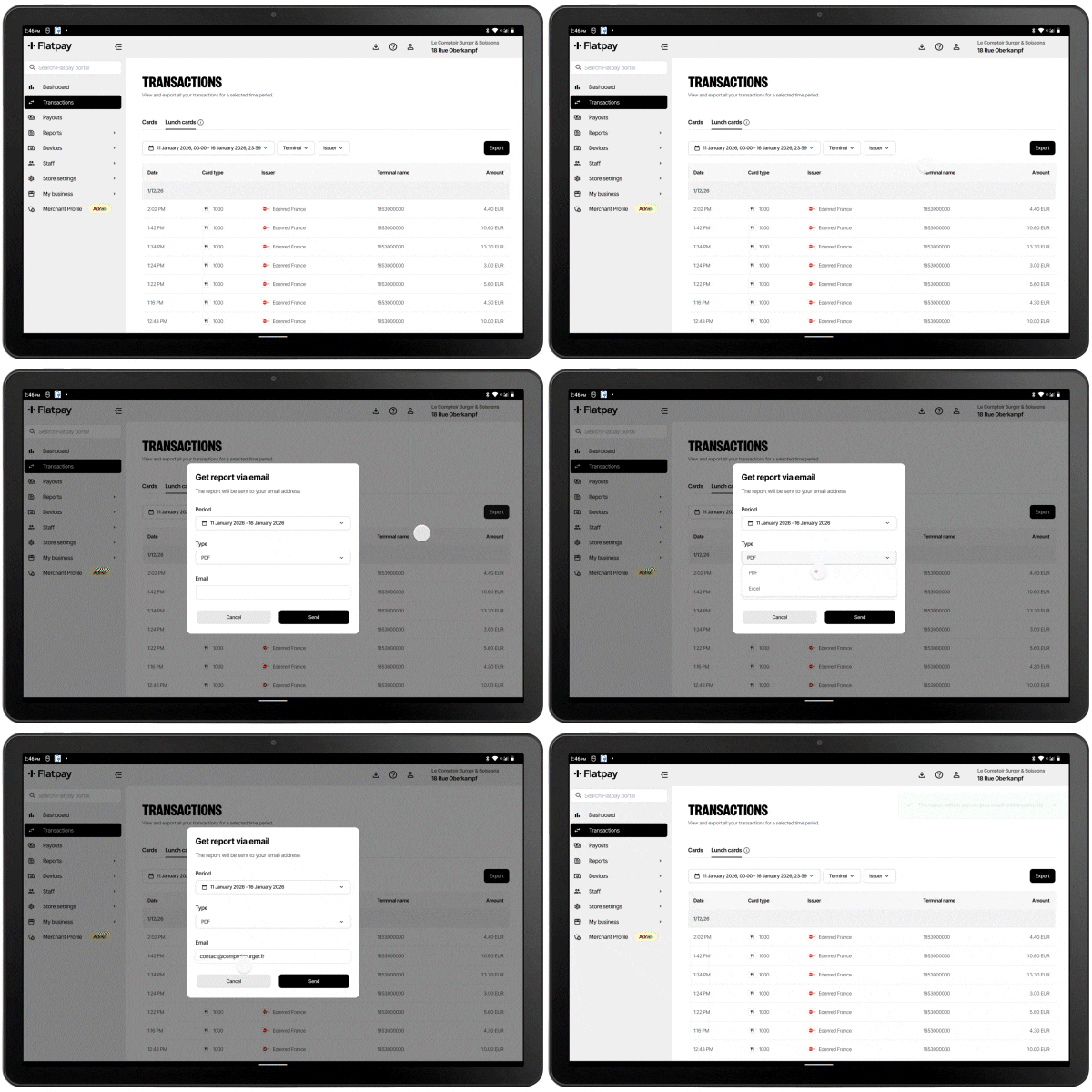
Where can I download my Lunch Card Transaction Report?
Go to your customer portal to access your report:
• Go to the page mentioned above:
“Transactions” (if you have a terminal)
“Card transactions” (if you have a cash register and a terminal)
• Click on the “Export” button at the top right to download your report
Who pays out my funds, what is my commission, and when will I receive them?
If payments were made with a Visa- or Mastercard-co-branded lunch card:
- Your payouts are managed by Flatpay and are included in your daily payouts.
- Flatpay applies your single transaction rate to all cards.
- Additional fees may be applied by the card issuers. To find out more, please refer to your contract with these issuers.
- You can find these transactions in your terminal’s transaction history or directly in your portal, as well as in your Z report (bank cards) under the Visa or Mastercard card types.
If payments were made with other lunch card issuers that are not Visa- or Mastercard-co-branded:
• Your payouts are managed by the card issuer and are not included in your daily Flatpay payouts.
• The payout timeframe depends on the issuer. In case of any issue, please contact the card issuer directly.
• Flatpay does not apply your commission rate to these transactions.
• Additional fees may be applied by the card issuers. To find out more, please refer to your contract with these issuers.
• You can find these transactions in your terminal’s transaction history or directly in your portal, as well as in your CONECS Z report or in your Lunch Card Transaction Report.
How can I contact the issuers?
UP COOP: 08 25 08 42 88 (8:30 a.m. to 5:00 p.m.)
EDENRED: 01 74 31 86 00 (9:00 a.m. to 5:00 p.m.)
SWILE: 09 74 59 42 17 (9:30 a.m. to 6:30 p.m.)
BIMPLI: 09 72 72 72 09 (9:30 a.m. to 6:30 p.m.)
PLUXEE: 09 69 39 77 47 (8:30 a.m. to 6:00 p.m.)
CONECS: 01 62 03 05 11 (9:00 a.m. to 5:30 p.m.)
Was this article helpful?
That’s Great!
Thank you for your feedback
Sorry! We couldn't be helpful
Thank you for your feedback
Feedback sent
We appreciate your effort and will try to fix the article